Finnix: Compact Linux distribution for system administrators
In July 2008, Cory Buford wrote a nice review of Finnix for linux.com, shortly after the release of Finnix 92.0. Unfortunately, the review did not survive linux.com’s transition to the Linux Foundation later that year, but I was able to save a copy, and with permission from the author, it has been reproduced here. Enjoy!
Edit (2011-07-02): It appears the review is back. Please see the original review on linux.com.
Finnix is a live CD distribution designed to assist system administrators in such tasks as system recovery and network monitoring. Based on Debian testing and Linux kernel 2.6, Finnix helps with filesystem and partition manipulation as well as with data recovery, installation of other operating systems, and boot record repair.
Finnix works on both x86/AMD64 and PowerPC systems. The latest release, version 92.0, fixes the Debian SSL (Secure Sockets Layer) vulnerability that was present in previous releases.
One nice thing about the distribution is its small size. Using SquashFS, the entire 300MB distribution was compressed into a bootable distribution just a little over 100MB. Its compact size notwithstanding, Finnix includes the latest technologies and applications for system administrators, including Logical Volume Manager 2 (LVM2), encrypted partitions, and multiple filesystem support.
To start using Finnix, download it from the author’s site and burn it to a CD. Since you will likely use this distribution to recover systems – the main intent of Ryan Finnie when he created it – booting it as a live CD is the preferred option. If you want to use the CD drive for other purposes, such as using Finnix tools to back up on a CD, you can also load the distribution into RAM; just make sure you have enough RAM – preferably at least 512MB – to hold the entire package.
You can also install Finnix to a hard drive using the fairly complex documentation given on the author’s site. Another option, once you’re inside Finnix, is to run the finnix-thumbdrive script to create a bootable Finnix USB drive.
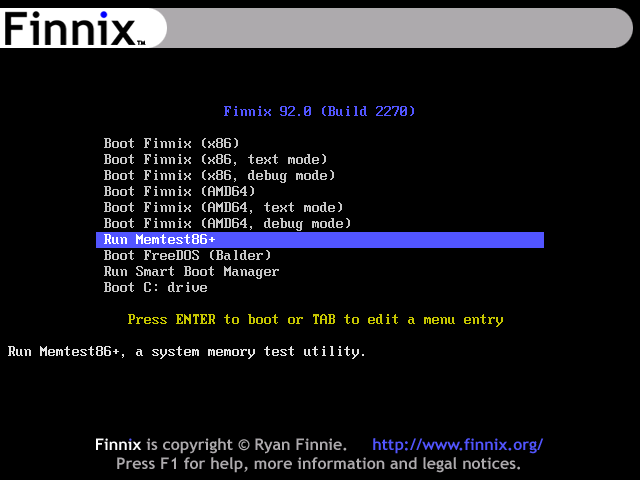 When you boot Finnix you will see a menu with several options. Although Finnix is designed to automatically detect the type of processor (either x86/AMD64 or PowerPC), you can still choose one yourself. You can run other useful tools – including Memtest86+, a utility for memory hardware diagnostics – from the boot menu. If you want to boot multiple operating systems on the system disk, you can use Smart Boot Manager, and for those who miss the DOS command-line interface, you have FreeDOS.
After you select a system, Finnix boots with no problems and with all hardware detected. You are then presented with a simple command-line interface (CLI); no graphical user interface (GUI) is available.
Finnix tools inside
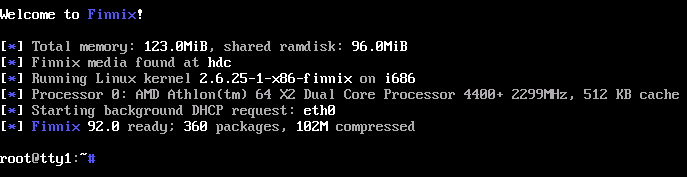 Despite the absence of a GUI, Finnix’s wealth of tools and utilities should be enough to satisfy system administrators or others tasked with system recovery. While recovery offerings such as Hiren’s BootCD are effective, Finnix can be more flexible, especially when you use the utilities along with proper scripting to their full extent.
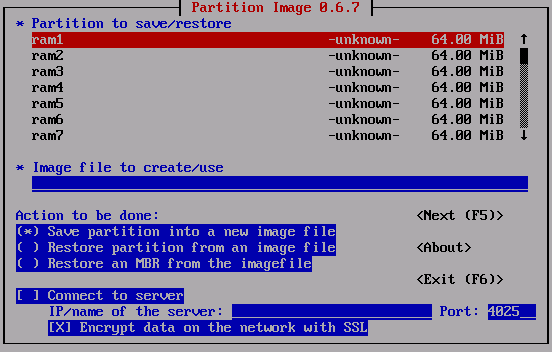 Among the available disk and partition manipulation and recovery tools is Partimage, which is comparable to Norton Ghost in functionality but also lets users back up or restore an image from a network server. In addition, Finnix includes the data recovery tool ddrescue.
Finnix offers many options for creating or manipulating filesystems. For filesystems such as ext2 and ReiserFS, there are e2fsprogs and reiserfsprogs, respectively. If you need to access or recover data from an NTFS partition, NTFS-3G and ntfsprogs are available. Also included is hfsutils, which supports Macintosh HFS volumes. Other supported filesystems include Unionfs, Cramfs and Squashfs. For volume management, there is Logical Volume Manager (LVM), which also supports LVM2, and EVMS (Enterprise Volume Management System), which supports NTFS and FAT, among others. Also included is Parted, for extending Linux partitions.
In addition to its disk manipulation and management support, Finnix is host to many monitoring, benchmarking, and diagnostic tools. lm-sensors can monitor system temperature, voltage, and fan status. For benchmarking and diagnostics, memtester stress-tests the memory system and helps find intermittent faults caused by overheating, unregulated power, and so on. To test how well your hard disk system is performing, Bonnie++ is included. For a complete stress test of the system, including the CPU, memory, and IO, a tool called stress is available.
A system recovery distribution such as Finnix would not be complete if it did not allow you to back up recovered data on external media. Finnix supports CDs and DVDs as backup media and includes a range of burning utilities, such as cdbackup, wodim, and dvdrecord, to make this process as fast and easy as possible. Although most of us are used to burning data with a GUI tool, burning data using commands is not that hard as long as you know the proper format, or filesystem, to be used. If you ever have difficulties, you can always issue the man command followed by the utility name for detailed explanations, or just search for the tool on the Internet to find its related documentation. Experienced users can also control SCSI tape drives for backup and restore using the mt-st tool. You can perform incremental backups over the network, and restore files, using rdiff-backup.
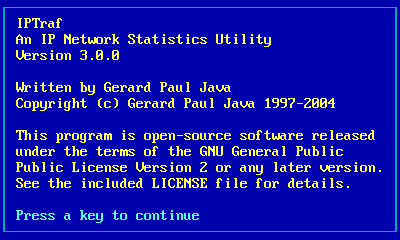 Since Finnix is for system administrators, it includes popular and useful networking tools such as Nmap, for scanning and auditing networks, and tcpdump, a powerful network packet monitoring tool. Also included are SNMP tools such as snmp; the IPTraf interactive LAN traffic monitor; network filtering and firewalls such as ipchains and iptables; various VPN tools for PPTP, IPSec, and SSL; and the common network accessibility tools ping and traceroute. Common Linux network interface management commands such as
 ethtool and ifdownup are included as well, as are tools for enabling network services such as NFS, Samba, and FTP.
I tested the partition management tools, especially Partimage and ddrescue. Although I encountered some problems because I did not use some of the parameters, I successfully created an image of a partition, stored it on a network drive, and recovered some data from a corrupted disk. I also tested the CD- and DVD-burning tools in the command line and, following the detailed explanation of the burning parameters, was able to burn data to a DVD. I found the Joe editor handy for editing configuration files; other editors, such as sed and Zile, are also provided. To see all Finnix’s packages, visit the official site.
A system administrator tool
Finnix 92.0 is a useful distribution for system administrators. With many tools covering jobs such as data recovery, hardware diagnostics and benchmarking, network services, and monitoring, this distribution can greatly help an administrator. However, Finnix is not for the average user accustomed to booting up a system and doing things graphically. While Finnix’s CLI-based tools are not that complex, one must have the necessary knowledge to fully understand how to use them.
I was satisfied with the packages included in this distribution, especially the filesystem management and recovery utilities, as well as the CLI backup tools. For serious network troubleshooting, I would recommend instead distributions such as Network Security Toolkit or BackTrack, which are specifically intended for such purposes.